
 Pieter-Degroote.info
International US QWERTY layout with AltGr (Right Alt) dead keys via AutoHotkey (Win), MSKLC (Win), Xmodmap (Linux) and XKB (Linux).
Pieter-Degroote.info
UltimateKEYS keeps all keys exactly like US QWERTY, but holding down AltGr (Right Alt) or AltGr+Shift (Right Alt + Shift) makes other diacritics and symbols accessible, and turns some keys into dead keys.
This way, it shares some similarities with “US-International”. However, this project attempts to solve the most common difficulties from its counterpart.
One of those : the quotes issue, with ' and " now accessible as usual. The similar-looking diacritics are now found on AltGr+' and AltGr+Shift+".
The layout of this project is derived from EurKEY (by Steffen Brüntjen, GPL v3).
The feature “Smart error-tolerant optimization for circumflex in French” allows typing the letters â, ê, î, ô, û more easily.
The AHK versions also have a ‘Hybrid SW’ edition that allows switching between ‘Classic’ and ‘SW’ using the Scroll Lock toggle.
=> Win/Linux : Only use “BASIC LATIN” characters (codes 32 to 126) for your Windows, Microsoft Live and Linux passwords !
Otherwise, it might be impossible to type any Unicode character higher than “Basic Latin” at the login screen/prompt (due to a different keyboard configuration) ! => ACCOUNT LOCKOUT
=> Win/Linux : ALWAYS make your system passwords VISIBLE during modification !
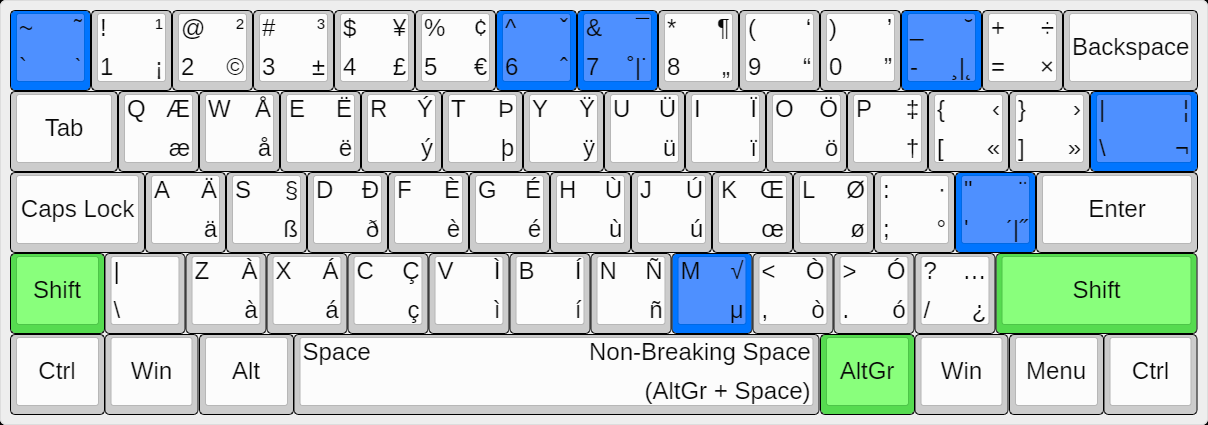
-> Blue keys : dead keys in combination with Right Alt (+Shift) or AltGr (+Shift).
UltimateKEYS is Free Software and is licensed under the GNU General Public License Version 3.
Derived from EurKEY, by Steffen Brüntjen.
This website and its contents are licensed under the GNU Free Documentation License Version 1.3.
Pieter Degroote - Please, give this website a try in dark mode (browser/system settings), it really looks marvel[l]ous ! 😇
Note : ‘AltGr’ is an abbreviation for ‘Alt(ernate) Graph’.